Plurk Snippet, username labels
April 24th, 2018 06:21 pm![[personal profile]](https://www.dreamwidth.org/img/silk/identity/user.png) terra posting in
terra posting in ![[community profile]](https://www.dreamwidth.org/img/silk/identity/community.png) vigils
vigils
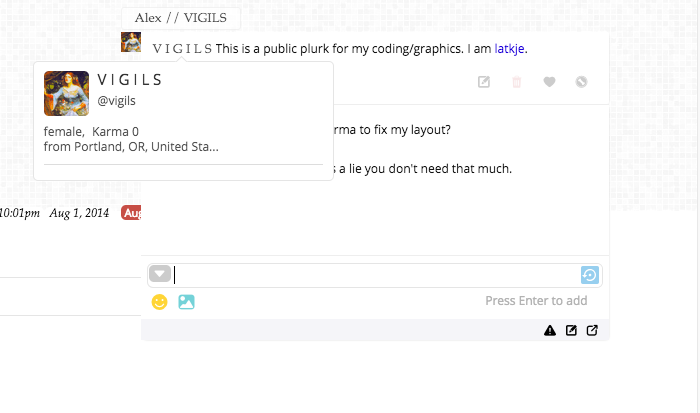
This is something I did at the request of jeeps, an update to the CSS tweak that lets you add a label to a plurk username that appears when you hover over a link. Useful for keeping track of your plurk friends who change their username frequently!
This needs to be installed via Stylus or a similar browser extention. If you're familiar with stylish, you can install the style here. If you need to install the extension first, it's available here for Firefox and here for Chrome
After you've installed the stylesheet, you need to be able to edit it. Here's what it code looks like:
a[href$="/USERNAME"]:hover:after {

    background: #fff;

    color: #000;

    border: 1px solid #eee;

    border-radius: .25em;

    bottom: 102%;

    left: 0%;

    padding: .25em 1em;

    position: absolute;

    z-index: 999;

    content: "DESCRIPTIVE TEXT";

}
USERNAME is the username you want the label to apply to, and DESCRIPTIVE TEXT is what you want the label to say. You can also tweak the colors pretty easily. By default, the label will match the font settings of the link it's attached to, but you can also change that if you like. Credit to biomagnet for the original code I updated.



no subject
Date: July 25th, 2018 06:33 pm (UTC)no subject
Date: July 27th, 2018 10:36 pm (UTC)no subject
Date: July 27th, 2018 10:51 pm (UTC)no subject
Date: July 27th, 2018 10:54 pm (UTC)no subject
Date: July 28th, 2018 05:46 am (UTC)Sweet, thanks!
no subject
Date: July 28th, 2018 06:30 am (UTC)